What is the QR Code Seating Chart?
The QR Code Seating Chart is an interactive event entrance tool built directly into Seat the Party. Instead of forcing 100+ guests to crowd around a single printed poster board or poster frame, you can print a stylish welcome sign featuring a scannable QR code.
When arriving guests scan the QR code with their mobile phone camera, it opens a fast mobile web page (at /share/{id}/search) where guests type 2 letters of their name to instantly locate their assigned table.
How to Set Up & Print Your Entrance QR Sign
- Open your event in the Seat the Party app.
- Click Share in the top menu or event settings panel.
- Scroll down to Event Day Seat Searching. Your unique event QR code is rendered automatically.
- Click Download QR Code to save a high-resolution PNG image of your QR code, or click Print Entrance Sign to open the printable entrance display.
- Display your QR sign at your venue welcome table, easel board, or acrylic sign display.
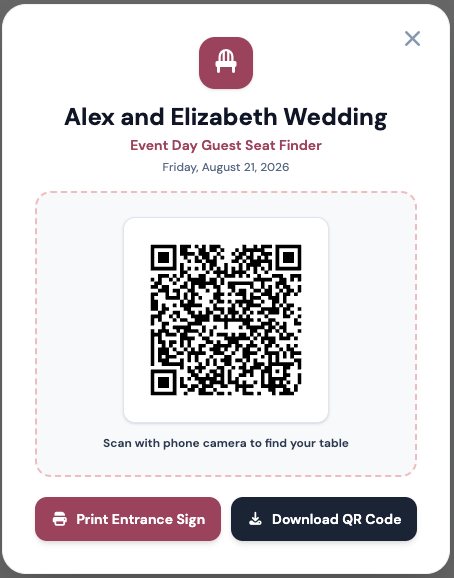
Print-Ready Entrance Sign Modal with custom event title & QR code
Mobile Guest Seat Search
When arriving guests scan your entrance QR sign using their iPhone or Android camera, they are brought directly to your mobile-friendly guest search page.
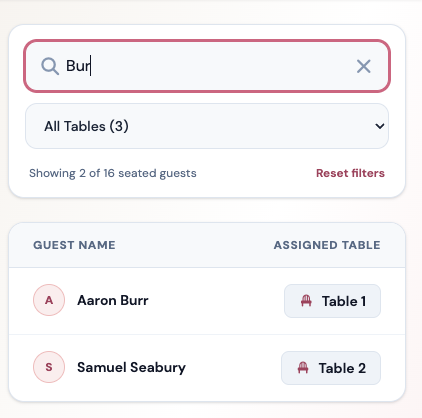
Instant guest autocomplete search screen — guests type 2 letters to find their table
- No App Downloads: Guests use their native phone camera — no logins or App Store downloads required.
- Instant Autocomplete: Typing 2 letters filters guests immediately to their table assignment.
- Eliminates Congestion: Dozens of guests scan simultaneously on their own phones instead of waiting in line at a poster.
Real-Time Day-Of Seating Updates
Had a last-minute table swap or cancellation on the morning of your event? Update the seating layout directly in your Seat the Party dashboard. The live QR search updates instantly without needing to re-print your entrance sign!
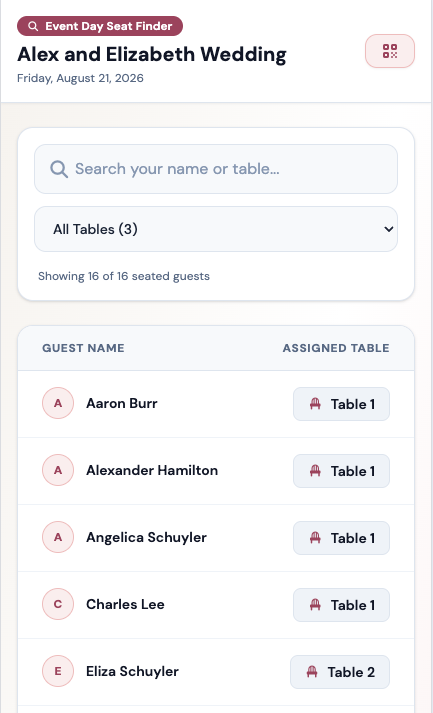
Event day live seating view for coordinators and event hosts