QR Code Seating Chart
QR Code Seating Chart.
Find Your Seat Instantly.
Print a stylish QR code sign for your reception entrance. Arriving guests scan with their phone camera, search their name in seconds, and head straight to their table — no crowds, no confusion.
Modern Reception Entrance Experience
See how Seat the Party works on event day
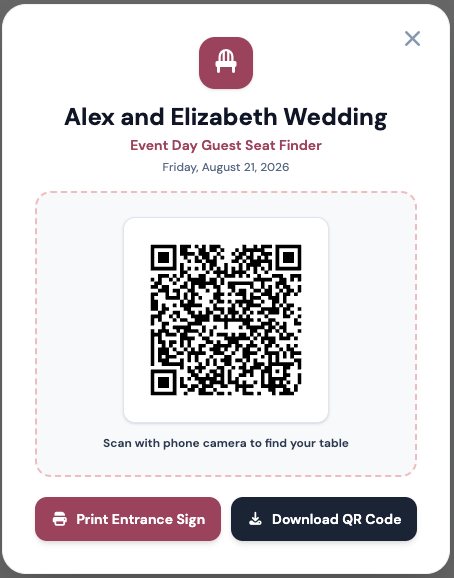
Print-Ready QR Sign
Place at your venue welcome table or easel sign
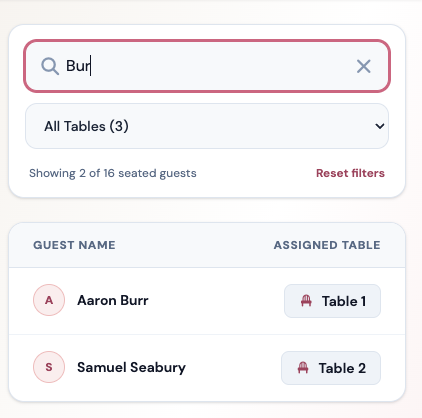
Instant Guest Seat Search
Type 2 letters of guest name for instant seat assignment
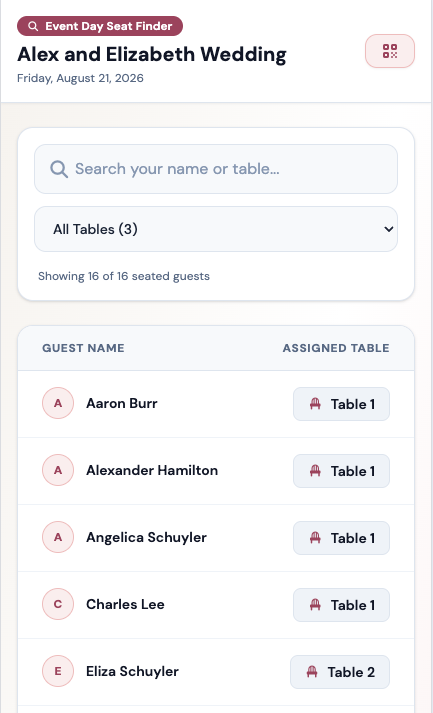
Live Seating & Tables
Live table assignments and seating details for coordinators
Simple 3-Step Process
How a QR Code Seating Chart Works
1. Build Your Chart
Create your wedding seating layout in minutes with our drag-and-drop table planner. Import your guest list from Excel or Google Sheets.
2. Print Entrance Sign
Click to generate your unique event QR code. Download high-resolution files to print on acrylic signs, foam boards, or welcome easels.
3. Guests Scan & Find Seat
At the reception entrance, guests point their phone camera at your QR sign. They type 2 letters of their name and instantly see their table!
Why Couples & Planners Love It
Designed for a smooth, stress-free wedding day
Instant Autocomplete Search
Guests don't have to squint at 200 tiny names printed in alphabetical order. Typing 2 letters shows their table assignment immediately.
No App Downloads Required
Works natively in iOS and Android phone camera apps. Guests tap the link banner and immediately open your web-based seat finder page.
Real-Time Day-Of Updates
Had a last-minute guest cancellation or table swap on wedding morning? Update it in your dashboard — the QR code updates automatically without re-printing!
Print-Ready High-Res Exports
Export vector SVG and crisp PNG QR codes designed to look stunning on acrylic boards, framed easel signs, wood displays, or placecards.
Eliminates Reception Bottlenecks
Prevents 100+ arriving guests from crowding around a single poster board during cocktail hour. Multiple guests scan simultaneously on their own devices.
Venue & Coordinator Approved
Wedding planners, day-of coordinators, and venue staff can also use the search link on their tablets for instant guest check-in at the door.
Comparing Your Options
QR Code Seating Chart vs Traditional Options
| Feature | Seat the Party QR Code | Printed Poster Board | Escort Cards |
|---|---|---|---|
| Instant Name Search | ✓ Yes (2-letter search) | ✕ Manual scan | ✕ Manual table search |
| Last-Minute Day-Of Swaps | ✓ Updates instantly | ✕ Requires re-printing | ✕ Requires re-writing cards |
| Prevents Entrance Crowds | ✓ Scanned on own phones | ✕ Crowds around board | ✕ Congestion at table |
| App Download Needed | ✓ None required | N/A | N/A |
| Printing Cost | Low (1 QR sign) | High ($80–$200 poster) | High (100+ cards) |
Frequently Asked Questions
Everything you need to know about QR Code Seating Charts
What is a QR code seating chart?
A QR code wedding seating chart is a modern alternative to traditional printed seating boards. Hosts place a printed QR code sign at their reception entrance. When arriving guests scan the QR code with their phone camera, it opens a mobile web page where guests type their name into an instant search box to find their assigned table in seconds.
Do wedding guests need to download an app to scan the seating chart?
No! Guests simply open the native Camera app on their iPhone or Android phone, point it at your QR code sign, and tap the link that appears. No app store downloads or logins are ever required for guests.
Can I make last-minute table changes on the day of the wedding?
Yes! This is one of the biggest advantages of a digital QR seating chart. If a guest cancels or needs to swap tables on wedding morning, update your seating chart in your Seat the Party dashboard. The change reflects live instantly on the QR search page without needing to re-print your entrance sign!
How do I print the QR code sign for my reception?
Once your seating chart is built in Seat the Party, generate your share link to view your custom QR code. Download the high-resolution QR image and place it onto your favorite sign design template (or print it directly) for easel boards, acrylic signs, or framed entrance displays.
Ready for a stress-free reception entrance?
Create your seating chart, generate your entrance QR code, and let your guests find their seats in seconds.
Build Your Free QR Seating Chart